Friday, March 23, 2007

GTViewer 7.0.x.4 is Available


Version 7.0.x.4 of GTViewer is available.

-----------------------
07.00.00.04 - 03/23/07
-----------------------

- NEW - GT/Field now supports the GTFieldAutoSave entry in the [Additional Properties] section. AutoSave will save the session graphics after each save in GT/Field. The default is on (1), but can be turn off by setting this entry to 0.

- NEW - The GpsTrailFilterId has been added to the [Additional Properties] section to allow a specific filter id to be used for the GPS trail when drawn as a session graphic. By default, it will use the current filter id.


Thursday, March 22, 2007

GTVx version 7.0.x.2 is Available


Version 7.0.x.2 of GTVx is available.

-----------------------
07.00.00.02 - 03/22/07
-----------------------

- NEW - Style definition Priority value can be now set from 0 to 25.

- NEW - Feature Counting now supports MeasureFactor, MeasureDegreeFactor, MeasureUnitLabel, and LatLongFlag.

- NEW - Export as XML now supports Dimension Elements (Type 112).

Tuesday, March 13, 2007

GTViewer version 7.0.x.3 is Available


Version 7.0.x.3 of GTViewer is available.

-----------------------
07.00.00.03 - 03/13/07
-----------------------
- NEW - Export as XML now supports Dimension Elements (Type 112).


- FIX - Export Data with the use alternate names would say there was not data if the defined structure for the embedded data was not valid. Now, it will revert back to the standard method and not try to apply the structure if it has a problem.

- FIX - Export as DGN was not applying the style rules to Text.

- NEW - New Methods:

New Doc Object Methods:

double GetElementAngle(long categoryId, long offset);

boolean GetElementTextSize(long categoryId, long offset,
long* lengthMult, long* heightMult);

New View Object Methods:

boolean GetStyleOriginForElement(long mode, long categoryId, long offset, VARIANT* originX, VARIANT* originY);


Wednesday, February 28, 2007

GTData version 7.0.0.1 is Available


Version 7.0.0.1 of GTData is available.


-----------
07.00.00.01 - 02/28/07
-----------

- NEW - GTInterGtg - xyFlag added to add coordinate info to tabular data.

- FIX - GTLabelGtg - was omitting the label for the last last item.

- NEW - GTLabelGtg - now supports mode 4 for point feature labels.

- NEW - GTIndex - support added for multi-line text with TrueType fonts.

- NEW - GTDataMap - Added to GTData.

- NEW - GTQuery - Supported added for table map option.

- FIX - GTPack, GTExtract - The ExtendedTextStyleColor value was not being properly placed in the extract file.

- CHG - GTQuery - Increased the number of omit and fixed values from 1000 to 2000.


Friday, February 23, 2007

GTViewer In the News

The Town of Groton, Massachusetts mobilizes emergency management with COGNET GIS & GTViewer, see the full article at GISCafe.


Also, check out COGNET's new Blog: cognetgis.blogspot.com


Wednesday, February 21, 2007

Maximize Initial View in GTViewer

Since the first version of GTViewer, creating a new session has always created a new view. The view is by default “not” maximized. Perhaps the main reason for defaulting the new view to not maximize was to show off GTViewer’s ability to support a Multi-Document/Multi-View environment. It is not readily obvious that this feature exists if the view windows are always maximized.

Since GTViewer version 4.0, there has been a setting under Options/Settings to change the behavior of a session’s initial view. The property is called Maximize Initial View and you can leave it like it is or you can change it to true which will maximize the initial view of any newly created session. You can then set this value as the default for the application and it will be used from that point forward.


A new session created with the Maximize Initial View set to No is shown below:


A new session created with the Maximize Initial View set to Yes is shown below:

Monday, February 19, 2007

Multi-Document/Multi-View Support In GTViewer


One feature that has been available in GTViewer since the very first version is its Multiple Document/Multiple View environment. This feature is a standard in most Windows applications especially those built around the Document/View architecture. However, only recently has the power of this feature been recognized by its users.

The Multi-View support provides the ability to have multiple views of a dataset; each view can be showing a different location or display different features at common location (such as gas only or electric only). The uses of these aspect of the feature is obvious. The Multi-Document support is a little more subtle in its usefulness. Multi-Document support allows more than one dataset to be opened in GTViewer at the same time; each dataset appears in its own view window (and you can then have multiple view of each dataset). Many users have only one dataset, so the multiple document support may not be useful (maybe). However, for those users who do have multiple datasets this feature can be very useful.

The multi-document feature is especially useful for companies transitioning their GIS. For example, let’s say your GIS uses Intergraph’s classic FRAMME and you are in the process of transitioning to Intergraph’s G/Technology or even an ESRI or Smallworld GIS. GTViewer allows you to use your classic FRAMME data while simultaneously viewing data from your new GIS (just in separate view windows). There are several advantages to having this multi-document support:


  • Data from your retired GIS is still accessible through a GTViewer snapshot of the data without maintaining the old GIS.

  • Users keep a common viewing application during the transition from one GIS to another; thus, there is no need to retrain the majority of the GIS data users on new software.

  • You can verify the new GIS by comparing its data to the old data GIS’s data in the same application. You can even use Redline’s or GT/Field to capture the problems and later update the GIS.

Sunday, February 18, 2007

GTViewer on Windows Vista

GTViewer 7.0 has been certified on Windows Vista. No changes were required to make GTViewer compatible with Windows Vista, so older versions should also run without compatibility issues. While there is no functionality in GTViewer specific to Windows Vista, you will notice the Windows Aero enhanced display. For example, GTViewer’s title bar will have the semi-transparent appearance as well as the other dialog box titles and borders. You will also notice other cool features such as the Windows Flip and Windows Flip 3D Animation.


Friday, February 16, 2007

GTViewer version 7.0.x.2 is Available


Version 7.0.x.2 of GTViewer is available.

-----------------------
07.00.00.02 - 02/16/07
-----------------------

- NEW - Style definition Priority value can be now set from 0 to 25.

- NEW - Feature Counting now supports MeasureFactor, MeasureDegreeFactor, MeasureUnitLabel, and LatLongFlag.

- FIX - Problem with counting highlighted features with no shape specified.

- NEW - New Doc Object Method:

boolean DrawClearAll(long mode);


Wednesday, January 31, 2007

Trippple Sevens – New versions of GTViewer, Pocket GTViewer, and GTVx


GTI releases new versions of 3 products today:

These new releases have a variety of enhancements, fixes, and new features.

Thursday, January 18, 2007

GTI at GITA 2007

GTI's Charlie Marlin will be a speaker at GITA 2007 at the Mobile Field Data Collection Technology Alternatives Knowledge Immersion Seminar. For more information see page 7 of the GITA conference program. Also, see page 15 for a picture of GTI's Mike Rogers at the Data Aquisition Seminar from GITA 2006 in Tampa.

GTI is also proud to be sponsoring the breakfast at the Ten Sails Smallworld Symposium following the GITA conference.

Monday, January 08, 2007

Why use a 3rd Party Viewer for your GIS Data

By Joey Rogers and Charlie Marlin

A question that GTI sometimes gets asked is “Why should I use your viewer for my GIS when I could use the viewer sold by my GIS vendor?” This is a question that deserves some deliberation.


Focus – Where is the “A” team?

GIS vendors are focused on making their GIS work correctly: creation of features, topology, updates, conflict resolution, etc. This characteristic is obvious if you take a look at popular GIS vendors and how their viewers are positioned (if they have a viewer at all). This focus is not a bad thing. You want the GIS data to be created and maintained properly. Let the GIS vendor do what it does best.

GTI is focused on developing the best viewer possible. While GTViewer capability spans the data analysis and data collection realms, its primary objective is providing the best viewer possible for people who need access to the GIS data.

GIS Vendors try to provide a full suite of products starting with the GIS itself then all of the periphery applications: Design, Analysis (or interfaces with Analysis packages), Plotting, Viewing, Data Collection. As the GIS vendors attempt to provide the full suite, the non-core applications have historically been neglected or overlooked. In the GIS data world, these applications that get pushed to the bottom are the ones used by the most people. This situation is ironic. Viewing applications should be given just as much attention as any other part of the GIS, especially since many more people use the GIS data through a viewer application than in any other way. The cost of the GIS viewer is not a significant part of an overall GIS solution, and GIS vendors have traditionally invested their money, time, and development in the higher dollar components. Reflecting its focus, GTI devotes all of its resources to the GIS viewer.


Design – For whom?

Many GIS viewers are simply stripped down versions of a full GIS seat or cannibalized parts of other applications that were never designed to be viewers. In some cases, a full GIS seat may be recommended by a GIS vendor as the viewing application (requiring the full GIS seat cost and complexity for a viewing seat). GTI has a very different approach to this problem. The overwhelming majority of actual users are not “GIS” users; they are customer service representatives, marketers, planners, linemen, tree trimmers, leak inspectors, construction foremen, supervisors, managers, etc. GTViewer was designed from the ground up as a usable, productive viewing tool without the distractive influences of a GIS. Why would you force the majority of the users of GIS data to learn an overly complicated interface designed for the smallest group of users?
The primary benefit of a field or office viewing product is that it allows people to use geospatial data to do their regular jobs more efficiently (which is the whole point of having a GIS). It is not economical to require such users to become GIS professionals. GIS professionals require extensive training and education. And they produce results that bring tremendous value to their companies, governments, and agencies. But forcing all users of geospatial data to become GIS professionals is like making all car passengers become mechanics. As an aside, I might remark that in the early days of automobiles, this may have been a reasonable requirement. Cars failed often. And anybody who drove one needed to work on it often to keep it going. (Many GIS veterans will say the same about the early days of their field!) But those times have passed. Cars are more popular and useful today than they were during their first 30 years precisely because they do not require full time maintenance. They can be designed for users rather than for mechanics. Likewise, today’s third party geospatial viewers can enhance a worker’s productivity by fitting in with that work directly, rather than by requiring advanced skills from a different occupation.


Integration – Fact or Fantasy?

One of the longest-running abuses of large software companies is their practice of leading customers to believe that because multiple software products are sold by the same company, they will work together seamlessly. Sadly, such integration is often not actually realized. For instance, many GIS vendors require the source GIS data to be converted or prepared for mobile applications, which is the same workflow taken by most third party viewing vendors. Alternatively, if the GIS vendor is not converting their data to a “mobile-ready” format, they are probably not providing geospatial data in the way that works best on mobile devices
The major GIS vendors have also invented the concept that only they can provide effective components for their GIS systems; it’s sort of like Ford Motor Company trying to claim that its cars can only use Ford tires. This concept is wholly untrue and in fact usually turns out to be a limiting characteristic instead of a strength. For example, viewers from one GIS vendor have never been effective when used on data from another GIS vendor. By contrast, GTViewer is not bound to any one GIS format, so it can support data from multiple GIS sources simultaneously whether you simply need support for multiple GIS sources or are transitioning from one GIS to another.


Price

The major GIS vendors have generally priced their viewing software fairly high and then discounted it heavily when bundled with their mainstream products. Just because something is sold at half its list price doesn’t mean it then has twice the value. A poorly designed tool that sells for less than a better-designed rival will only save money the first day. The buyer will pay for the difference every day his employees use a second-best tool.


Pedigree
How did the software start out? Was it a CAD product that morphed into a mapping tool? Did it result from a crash program to create a me-too product, driven by market pressure? GTViewer has a unique history. It was designed starting with a clean sheet of paper by a software architect who had spent years working with viewing software and its users. GTViewer reflects insights gained through practical experience. Now in its fifth major release, GTViewer does what people should expect. It scales to large data sets. It shows aerial photography. It allows users to sketch intuitively. It provides a rich array of view controls that can declutter or emphasize what the user wants to see with minimal or no effort from the user. Printing, GPS integration, and a query subsystem are all included. Snappy performance is standard. Crucially, all these features are provided through an engaging and approachable user interface that is suitable for people without GIS backgrounds.

GTI at DistribuTECH, Feb 4-6, 2007

Come to San Diego and visit GTI in booth 644 at the DistribuTECH conference, February 4-6. See GTViewer, the price-performance leader in geospatial viewing, along with advanced applications such as valve isolation, circuit tracing, and outage inference. GT/Field, a configurable data collection application, will be featured on hand-helds and laptops. New editions of GTWeb will also be demonstrated.

Wednesday, December 27, 2006

GTVx Version 5.0.x.12 is Available


Version 5.0.x.12 of GTVx is available.

-----------------------
05.00.00.12 - 12/27/06
-----------------------
- FIX - The Export button on the Display Preset Dialog was always enabled even when no preset item was selected.


-----------------------
05.00.00.11 - 12/08/06
-----------------------

- FIX - QueryActivate and QueryPerform were not recognizing Query Type 13 as thematic query.


GTViewer version 5.0.x.27 is Available


Version 5.0.x.27 of GTViewer is available.

-----------------------
05.00.00.27 - 12/27/06
-----------------------
- CHG - Change to the NMEA GPS reader to better support virtual COM ports or GPS sharing devices.


- FIX - The Export button on the Display Preset Dialog was always enabled even when no preset item was selected.


Friday, December 01, 2006

GTViewer version 5.0.x.26 is Available


Version 5.0.x.26 of GTViewer is available.

-----------------------
05.00.00.26 - 11/30/06
-----------------------

- FIX - Export as Dgn was not setting the origin correctly in orphan cell headers which caused all grouped elements from the GTViewer data to scale and rotate incorrectly in Microstation.

- NEW - Export as Dgn will now export Extended Style Information as UDLS tags on the dgn elements.

- FIX - Fixes to the Style Manager's Import Map and Def funtionality.

- NEW - ExternalStyleMapFile and ExternalStyleDefinition entries can be added to the addprop.ini file or the Additional Properties section of the .GTM. If defined, these entries will import the specified .map or .def files.

- FIX - Text Elements with embedded data would lose the embedded data if edited with the Element Properties dialog.

- FIX - Reading an element would partially reset a DrawSetData. It will now fully reset the information.

- FIX - Right Mouse Menu would not activate when in Draw Dimension or Leader line modes.

- FIX - Updates to Magnify Window to provide a smoother appearance when scrolling, especially with dark or black backgrounds.


GTVx version 5.0.x.10 is Available


Version 5.0.x.10 of GTVx is available.

-----------------------
05.00.00.10 - 11/30/06
-----------------------

- FIX - Export as Dgn was not setting the origin correctly in orphan cell headers which caused all grouped elements from the GTViewer data to scale and rotate incorrectly in Microstation.

- NEW - Export as Dgn will now export Extended Style Information as UDLS tags on the dgn elements.- FIX - Text Elements with embedded data would lose the embedded data if edited with the Element Properties dialog.

- FIX - Reading an element would partially reset a DrawSetData. It will now fully reset the information.

- FIX - Right Mouse Menu would not activate when in Draw Dimension or Leader line modes.

- NEW - ExternalStyleMapFile and ExternalStyleDefinition entries can be added to the addprop.ini file or the Additional Properties section of the .GTM. If defined, these entries will import the specified .map or .def files.


Thursday, November 16, 2006

Can Pocket GTViewer be a Usable Viewing Platform?

Many people today still view Pocket PC or Windows Mobile devices as a novelty with little or limited practical use. There are generally 3 arguments against the handheld device for any application: 1) they are not powerful enough, 2) they can not hold enough data to be useful, and 3) their screens are too small to see anything (especially maps). I hope to dispel these myths and attempt to get more people looking at the handheld platform. Pocket GTViewer is an excellent application for the mobile community. If you are not utilizing this application in some way, you are missing out on a rich resource for viewing, data collection, and general accessibility to your GIS information.

Pocket GTViewer has been in existence as long as the desktop version of GTViewer, and it has progressed through several generations of Windows CE. The first version of Pocket GTViewer, introduced almost 6 years ago, supported Window CE 2.11 and the processor of the time was the Hitachi SHO running at 133 MHz. Pocket GTViewer has since supported Windows CE 3.0, Pocket PC, Handheld PC 2000, Pocket PC 2002, Windows Mobile 2003, Windows Mobile 2003 Second Edition, Windows CE.NET, and now Windows Mobile 5.0 (Window Mobile 6.0 is coming soon). I list all of the different platforms to show how quickly the handheld devices are evolving.

Let’s go through the arguments against viewing your GIS data on the handheld platform one item at a time and see how they are no longer valid excuses. The first argument is that the devices are not powerful enough. I think this argument has always been untrue. While the handheld devices are certainly not as powerful as a desktop PC, the devices of 6 years ago were more than capable of viewing complex vector map data. Pocket GTViewer was designed from the beginning to work with these slower processors and with minimal resources. On today’s handhelds, with processors 5 times faster, video hardware acceleration, and quadruple speed (or more) memory, Pocket GTViewer screams.

The second argument is not enough storage. Six years ago this might have been partially true. CF cards of that time were commonly in the range of 16M to 40M and a 100M CF card could easily cost more than the handheld device. At that time, you had to be a little more selective with what data you took with you; however, 40M of GTViewer data is a lot of information and rarely did I see a problem with not being able to take all the data along that was needed. Also, the 1G Microdrive provided some relief early on for those who needed extra storage at a premium price. These mechanical drives were very fast and usable even if they were deemed a bit fragile and consumed some precious battery power. Today, storage problems are all out the window; 4G+ memory cards (CF and SD) are common place and 2G cards very inexpensive ($70 or less). Solid state, fast, huge, and non-volatile, what more could you ask for?

The last argument is the usability of the screens which probably carries the most weight when deciding against the handheld devices as a platform. In the beginning, the standard Pocket PC and Windows Mobile screens are usually 3.5” diagonal with ¼ VGA resolution (240x320). If you leave the mainstream, there have always been a variety of screen sizes available; the only downside being that they are usually more expensive and use one of the more vanilla flavors of Windows CE (like Windows CE 3.0 and Windows CE.NET) which do not have some of the built in extras you find in Pocket PC and Windows Mobile. With the addition of Windows Mobile Second Edition, the screens are the same physical size, but they can now have full VGA (640x480) resolution and can operate in either Landscape or Portrait modes. This resolution increase is a much more profound change than it may seem at first. Going from ¼ VGA to full VGA quadruples the number of pixels in the same screen area and gives an amazing amount of clarity to graphics like the vector maps Pocket GTViewer displays. (This is one of those things you have to see to fully appreciate.) With Windows Mobile 5.0, the standard screen size is no long a standard and we see different aspect ratios. For example, the Treo 700w has a square screen.

There are really two issues when it comes to screen size. One is the hardware limitation and the other is thinking “desktop” when you have a “handheld.” The hardware limitation is really not an issue now with the full VGA screens (and really never was with ¼ VGA screens either). The screens are still small, but they are now crisper than your desktop’s screen and can still fit in your shirt pocket. The second problem has to do with doing the right job with the right tool. If you are trying to view all outages in your service area, a 3.5” screen is not the right tool. The tool for this job is GTViewer or GTVx, not Pocket GTViewer. However, the 3.5” screen with ¼ VGA or full VGA resolution is ideal for viewing a map up close. For example, you want to know if there are any underground utilities at an address, or you need to see what equipment is installed on a particular pole. A handheld device is like one of those little notepads with the wire spiraled around the top. You hold it in one hand and write on it with the other. So, what would you use a notepad for in the field? Taking notes, drawing sketches, filling out forms. Couple these tasks with an intelligent map supported by all of your GIS data and you have a very power tool in the palm of your hand.

Desktop GTViewer and Pocket GTViewer work well together. One is not a replacement for the other. GTViewer on your desktop PC can extract data for the handheld to take into the field, and receive redlines and/or collected data. GTWeb is also integrated with Pocket GTViewer allowing a web interface for selecting and loading data. Pocket GTViewer extends your GIS into places that were not always accessible before. I always carry my handheld with me, but I only lug my laptop around when I have to. Having the right information at the right time can make all the difference in the world.

The future is bright in the mobile arena. Beyond the Windows Mobile devices, we have SmartPhones and Ultra Mobile PCs. More and more devices today have built in GPS capabilities as well as cameras. Wireless connectivity is also becoming faster, more reliable, and more affordable. GTI’s product lines adapt to take advantage of the latest technologies available. You will see these new technologies leveraged in Pocket GTViewer, GTViewer, GTVx, and GTWeb.


This article was originally published in COGNET's GIS Advisor Newsletter:


Monday, November 06, 2006

Disclaimers, Messages, and Descriptions

How to inform thee, let me count the ways…

System administrators often need to provide information, in some way, to the people using GTViewer. There are three ways, and each is suited to a slightly different use. Each one is implemented as a parameter in the [General Info] section of the GTM file. Let’s take them in this order: Description, Message, then Disclaimer.

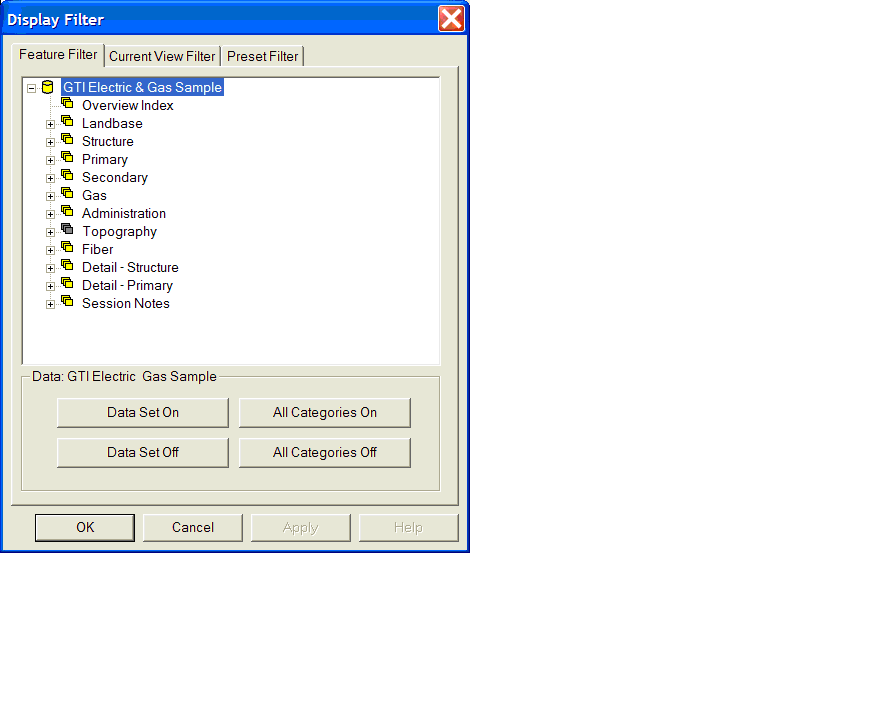
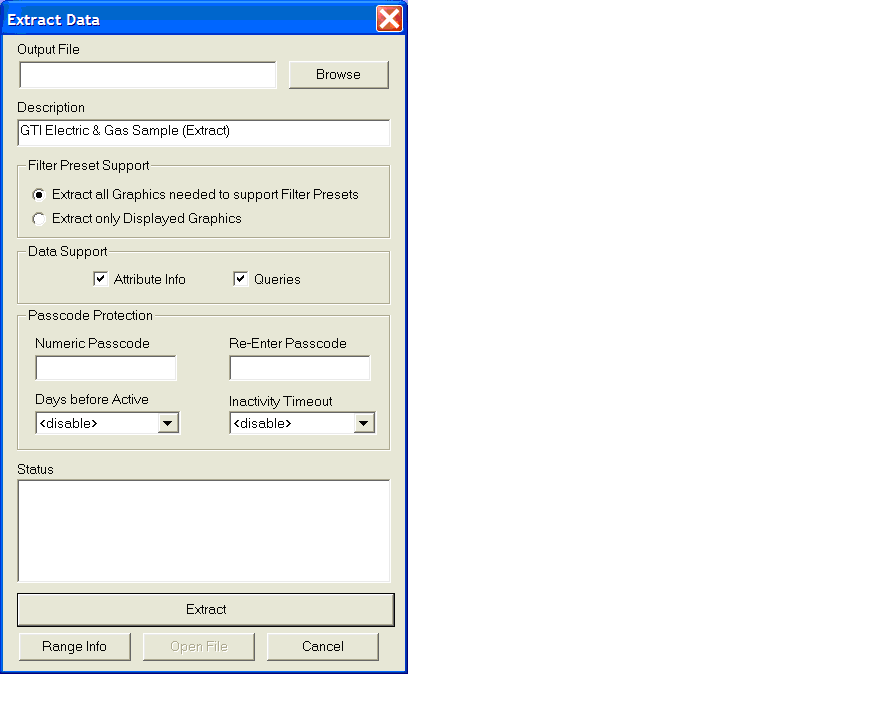
Description – This property specifies a one line description of the data. This description appears in several places:

- in the display filter
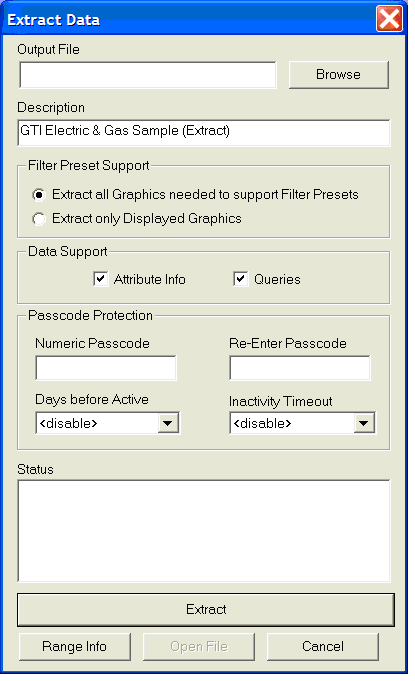
- in extract file descriptions
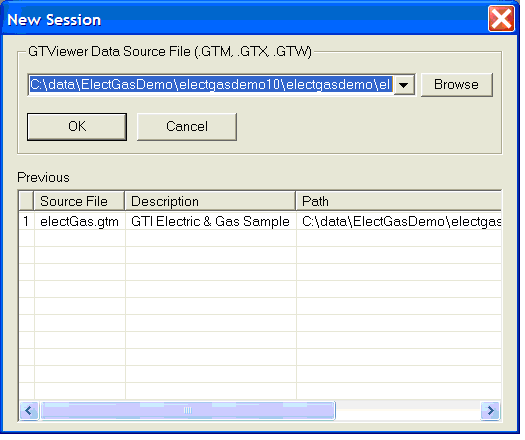
- in the new session dialog
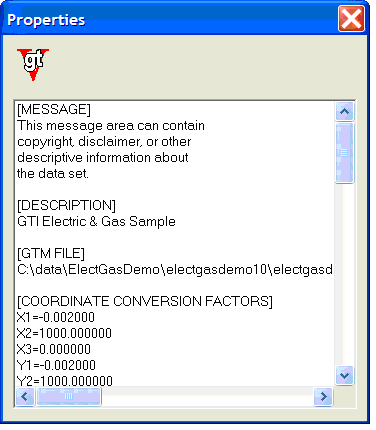
- in the file > properties dialog

Here is an example of each one:

Display Filter:


Extract file description in the Tools > Extract Data by Fence


The New Session Dialog:


File > Properties Dialog:


Message – This property can be used to specify text to be displayed in the File > Properties dialog in GTViewer and the GTV > About > Open File dialog in Pocket GTViewer. The Message entry can be repeated as many times as necessary and can be used for copyright information, disclaimers, etc. The example above of the File > Properties dialog shows both Message and Description.

Disclaimer – This property can be used to specify text for a disclaimer that must be accepted before the data can be opened. The Disclaimer is limited to 255 characters per entry. It can also be set to <*blank*> to insert blank lines. The Disclaimer entry can be repeated as many times as necessary.

Here are two examples. The first shows the use originally intended, namely, to require the user to actively accept a legal notice. This is the actual disclaimer used by Jackson Electric Membership Corporation (JEMC).


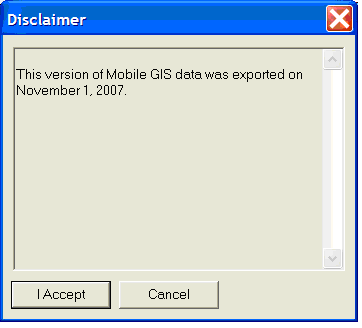
The same technique can be used to present users with notices they ought to read but might skip. In this case, the administrator wants the people using GTViewer to know when their data set was exported from the GIS.


If they accept, GTViewer displays the data. If they Cancel, GTViewer exits.

I hope this blog posting has given administrators some ideas of how to inform users in the most suitable manner. And I hope at least a few readers were more amused than outraged by my distortion of Elizabeth Barrett Browning’s sonnet.